
Avatar image from Alan's blog

AlanJS.dev

Back
Loading image...
React logo icon

Warning

This post was made with React version 18, so some concepts may vary in previous and future versions

react javascript english

You probably don't know React

This post will deal with the internal workings of React, I'll try to be as concise as possible within the realm of possibility so as not to confuse or get into super technical details, although sometimes it will be inevitable

How does React work?

First of all, once we load React on our website, JavaScript sets the necessary values for React to work, an example of this can be the lanes, which play a very important role in React’s architecture. Once all the flags, variables, objects and functions are set for React to work, React’s guide tells us to make use of createRoot() (this according to React version 18, which is what we base this presentation on)

How does createRoot work then?

In essence, I don’t want to make a topic that already has enough complexity more complex than it is, so I’m going to try to keep it simple. React needs a DOM element called root to build the virtual DOM tree that React uses underneath, but it should be noted that in previous versions createRoot didn’t exist as such, and it’s not simply a function that was used as an alias to replace the render from previous versions, but rather createRoot enables what is called a concurrent root, which is nothing more and nothing less than enabling concurrency functions for the currently selected root, this way we can enjoy benefits such as task prioritization algorithms in our application.

Practically what createRoot does is:

  1. Validates if the container we pass is a valid element to be used as a container
  2. Creates a container createContainer
  3. Marks the container as root, i.e., as the root of the tree
  4. Listens to ALL supported events at the root of the tree (Please see Events before reviewing this section)
  5. Returns the creation of a ReactDOMRoot instance (which is essentially a FiberRoot)

So the createRoot code could look something like this:

const ConcurrentRoot = 1; // A flag that will help us enable concurrency
function createRoot(container) {
// Validate the container
// Create the container
// Mark the container as the app's root
// Listen to ALL events on the root
// Return a ReactDOMRoot instance
//if(!isValidContainer(container)) throw new Error ("The container is not a valid DOM element");
//const root = createContainer(container, ConcurrentRoot);
//markContainerAsRoot(root.current, container);
//listenToAllSupportedEvents(root);
//return new ReactDOMRoot(root);
}
/*=========================*/
const randomKey = Math.random().toString(36).slice(2);
const randomKeyIdentifier = '__reactContainer$' + randomKey;
// Simply a constructor
function ReactDOMRoot(internalRoot) {
this._internalRoot = internalRoot;
}
// The render function we use
ReactDOMRoot.prototype.render = function() {
console.log("rendering logic");
}
// Mark the container as the root leaving an identifier in the HTML node properties
function markContainerAsRoot(hostRoot, realDOMNode) {
node[randomKeyIdentifier] = hostRoot;
}
// The logic to create the container
function createContainer(node, ConcurrentRoot) {
console.log("creating container logic");
return node;
}
// Logic to listen to ALL events on the root
function listenToAllSupportedEvents(root) {
console.log("adding listener to all supported events");
}

Container validation

Container validation is something simple, it only does basic validations, so in code we would have the following:

// We store the numbers that represent each node
const ELEMENT_NODE = 1;
const DOCUMENT_NODE = 9;
const DOCUMENT_FRAGMENT_NODE = 11;
const ConcurrentRoot = 1; // A flag that will help us enable concurrency
function isValidContainer(realDOMNode) {
return !!(node && (node.nodeType === ELEMENT_NODE || node.nodeType === DOCUMENT_NODE || node.nodeType === DOCUMENT_FRAGMENT_NODE));
}
function createRoot(container) {
if(!isValidContainer(container)) throw new Error ("The container is not a valid DOM element");
//const root = createContainer(container, ConcurrentRoot);
//markContainerAsRoot(root.current, container);
//listenToAllSupportedEvents(root);
//return new ReactDOMRoot(root);
}

Creating the root container for React

The code that handles the creation of the root container for React is something similar to this:

function createContainer(containerInfo, tag) {
const initialChildren = false;
return createFiberRoot(containerInfo, tag);
}

The initial children must be false because by default the root will not have any children, what this really means is that very possibly the component (typically called:) <App /> will be its child, but we will specify that with root.render(<App />).

As we can see, the function is not very descriptive in itself, since it returns the value returned by the createFiberRoot function, so we can take advantage to see the code of the createFiberRoot function (it should be noted again, that this is a very simplified version):

/*
React internal identifiers with their respective numbers:
const FunctionComponent = 0;
const ClassComponent = 1;
const IndeterminateComponent = 2; // Before we know whether it is function or class
const HostRoot = 3; // Root of a host tree. Could be nested inside another node.
const HostPortal = 4; // A subtree. Could be an entry point to a different renderer.
const HostComponent = 5;
const HostText = 6;
const Fragment = 7;
const Mode = 8;
const ContextConsumer = 9;
const ContextProvider = 10;
const ForwardRef = 11;
const Profiler = 12;
const SuspenseComponent = 13;
const MemoComponent = 14;
const SimpleMemoComponent = 15;
const LazyComponent = 16;
const IncompleteClassComponent = 17;
const DehydratedFragment = 18;
const SuspenseListComponent = 19;
const ScopeComponent = 21;
const OffscreenComponent = 22;
const LegacyHiddenComponent = 23;
const CacheComponent = 24;
const TracingMarkerComponent = 25;
*/
// In this case we're going to use HostRoot
const HostRoot = 3;
function FiberRoot(containerInfo, concurrentMode) {
this.tag = tag;
this.containerInfo = containerInfo;
this.pendingChildren = null;
this.current = null;
/*Many more necessary and useful properties that React needs*/
}
function FiberNode(tag, pendingProps, key) {
this.tag = tag;
this.key = key;
this.elementType = null;
this.type = null;
this.stateNode = null; // This has to be a fiber
this.return = null;
this.child = null;
this.sibling = null;
/*Many more necessary and useful properties that React needs for fibers*/
}
function createFiber(tag, pendingProps, key) {
return new FiberNode(tag, pendingProps, key)
}
function createFiberRoot(containerInfo, concurrentMode, initialChildren) {
// Create a FiberRoot that will allow React to create a tree of Fibers (like the DOM, but in Fibers)
const root = new FiberRoot(containerInfo, concurrentMode);
const uninitializedFiber = createFiber(concurrentMode);
root.current = uninitializedFiber;
uninitializedFiber.stateNode = root;
// Just so you know, in this section would go much more React logic
// such as the logic of an internal cache that it uses, and the memoizations
// that will not be the main topic of this post. Also React will initialize
// an update queue for fibers that are still uninitialized
return root;
}

The createFiberRoot function is responsible for generating the root of a tree of Fibers (it doesn’t matter yet if we don’t understand the totality of the concepts, we’ll address them in a moment).

Fibers

If I had to choose for you to understand only one thing from all this, without a doubt it would be the fibers, fibers in React have FUNDAMENTAL importance. The main objective of Fibers is to allow React to pause, resume and reuse rendering work as needed to improve performance.

But… What are they? Fundamentally, a Fiber in React is like the minimum unit of work, similar to what an atom is to a molecule. It can be an abstract concept, but let’s try to illustrate it with a more tangible and practical example: let’s imagine a football match.

In a match, each player follows a set of instructions and reacts to situations in the match in real time. Let’s suppose that a fan or intruder unexpectedly enters the field. Just like in React, where an update can interrupt the rendering process, the game stops. Security personnel activate a protocol to handle the situation, similar to how React would handle a user event or a high priority state update.

Meanwhile, the referees control the situation, making decisions and possibly temporarily stopping the match, like React would do when pausing work in progress. The players, for their part, stop playing following the rules of the game, knowing that any action during the pause doesn’t count for the final result. That is, the fibers in this case, would be the set of instructions that each person participating in the match has, and that knows how to react to a certain situation.

It can even happen that the security team intercepts the intruder before they enter the field proper, so there would be no need to pause the match. In such case the referee knows that it’s not necessary to pause the match because it doesn’t affect the game at all, and they know this because the security team (the work unit - the fiber -) managed to intercept the intruder.

Fibers for React can be logical work processes, functional components (yes, fibers are not only components), class-based components, fragments, texts, etc.

Continuing with this example, we could say that the players are the components, and each player has their game plan (their mental logical process of how to play the match) according to their role, we could say then that a player has their equivalent in a fiber. But the referee also (despite not being a component) must have their equivalent in a Fiber, since they also have a plan, and if the referee performs certain actions they must inform the rest (for example the players), this means that each Fiber must act in consequence to the changes.

As we can see it’s more of a concept, we can’t establish a direct analogy with something real, from everyday life.

Marking a container as the root

In this step we simply put an internal React identifier on the node (real DOM) to recognize it as a root, the function would be something like this:

const randomKey = Math.random().toString(36).slice(2);
const randomKeyIdentifier = '__reactContainer$' + randomKey;
// Mark the container as the root leaving an identifier in the HTML node properties
function markContainerAsRoot(hostRoot, realDOMNode) {
realDOMNode[randomKeyIdentifier] = hostRoot;
}

Events (listenToAllSupportedEvents function)

  1. React separates events into two types, delegated (those that do bubbling) and non-delegated (those that don’t do bubbling), it’s important to mention that anyway, all native events have a capturing phase.
  2. Why does React listen to ALL native events? React has a very ingenious way of handling events, because in JavaScript events do bubbling and/or capturing React decides to take advantage of this behavior so that instead of listening to individual events, events are listened to at a higher level this way it doesn’t need to add multiple events for different elements, obtaining performance improvements.
    1. The problem with this approach is that not all events do bubbling, so React creates a Set of these NON-DELEGATED events (events that don’t do bubbling) and adds them only in the capturing stage. And to events that do bubbling it listens to them both in their capture phase and in their bubble stage.
  3. To clarify about the previous example React does something similar (the source code contains much more logic) to this:
    const allNativeEvents = new Set()
    function registerEvents() {
    // Logic to list all events and incorporate them into the allNativeEvents set
    const events = ['abort', 'auxClick', 'cancel', 'canPlay', 'canPlayThrough', 'click', 'close', 'contextMenu', 'copy', 'cut', 'drag', 'click']; // etc...
    for (let i = 0; i < events.length; i++) {
    allNativeEvents.add(events[i]);
    }
    }
    function listenToNativeEvent(eventName, isCapturePhase, element) {
    if (isCapturePhase) {
    // Add event listener for the capture phase
    element.addEventListener(eventName, eventHandler, true);
    } else {
    // Add event listener for the bubble phase
    element.addEventListener(eventName, eventHandler, false);
    }
    }
    // Function that iterates over events and decides how to add listeners
    function listenToAllSupportedEvents(rootContainerElement) {
    allNativeEvents.forEach(function (domEventName) {
    if (domEventName !== 'selectionchange') {
    // If the event is not in the non-delegated set, add for bubbling
    // that is, if it's a delegated event then add for the bubbling phase
    if (!nonDelegatedEvents.has(domEventName)) {
    listenToNativeEvent(domEventName, false, rootContainerElement);
    }
    // Add event listener for the capture phase in all cases
    listenToNativeEvent(domEventName, true, rootContainerElement);
    }
    });
    }
  4. How does the source code differ? My idea is for you to have solid knowledge about React but without us getting into so many technicalities (although to understand this topic I find it impossible not to use some), but I see the need to elaborate here. React doesn’t simply add events, it also adds them separating them into active and passive events, then it gives them a priority. A picture is worth a thousand words:
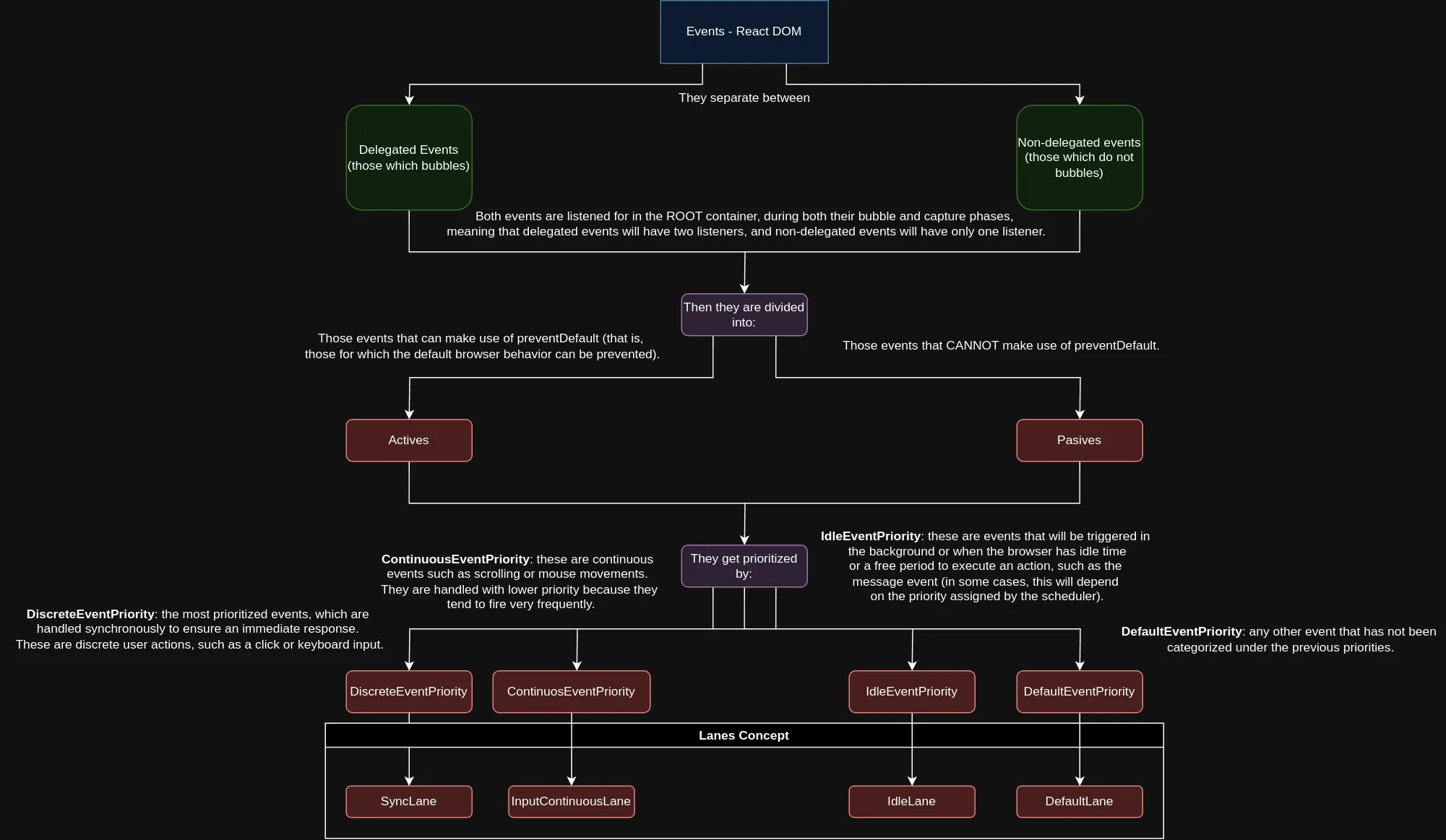
How react handle the events

ReactDOMRoot

What is done once a ReactDOMRoot instance is created is to set internally, in React, the root, but this time it’s not a node from the real DOM, but the root once it has its equivalence in Fiber. The code would be something like this:

// Simply a constructor
function ReactDOMRoot(internalRoot) {
this._internalRoot = internalRoot;
}
// The render function we use
ReactDOMRoot.prototype.render = function() {
console.log("rendering logic");
}

As we can observe, it also adds a render prototype, this is because at some point in our React application, we will make use of:

root.render()

Final createRoot code

So far our code would look like this:

const ConcurrentRoot = 1; // A flag that will help us enable concurrency
const randomKey = Math.random().toString(36).slice(2);
const randomKeyIdentifier = '__reactContainer$' + randomKey;
const HostRoot = 3;
const ELEMENT_NODE = 1;
const DOCUMENT_NODE = 9;
const DOCUMENT_FRAGMENT_NODE = 11;
const allNativeEvents = new Set()
function isValidContainer(realDOMNode) {
return !!(node && (node.nodeType === ELEMENT_NODE || node.nodeType === DOCUMENT_NODE || node.nodeType === DOCUMENT_FRAGMENT_NODE));
}
function FiberRoot(containerInfo, concurrentMode) {
this.tag = tag;
this.containerInfo = containerInfo;
this.pendingChildren = null;
this.current = null;
/*Many more necessary and useful properties that React needs*/
}
function FiberNode(tag, pendingProps, key) {
this.tag = tag;
this.key = key;
this.elementType = null;
this.type = null;
this.stateNode = null; // This has to be a fiber
this.return = null;
this.child = null;
this.sibling = null;
/*Many more necessary and useful properties that React needs for fibers*/
}
function createFiber(tag, pendingProps, key) {
return new FiberNode(tag, pendingProps, key)
}
function createFiberRoot(containerInfo, concurrentMode, initialChildren) {
// Create a FiberRoot that will allow React to create a tree of Fibers (like the DOM, but in Fibers)
const root = new FiberRoot(containerInfo, concurrentMode);
const uninitializedFiber = createFiber(concurrentMode);
root.current = uninitializedFiber;
uninitializedFiber.stateNode = root;
// Just so you know, in this section would go much more React logic
// such as the logic of an internal cache that it uses, and the memoizations
// that will not be the main topic of this post. Also React will initialize
// an update queue for fibers that are still uninitialized
return root;
}
// Simply a constructor
function ReactDOMRoot(internalRoot) {
this._internalRoot = internalRoot;
}
// The render function we use
ReactDOMRoot.prototype.render = function() {
console.log("rendering logic");
}
// Mark the container as the root leaving an identifier in the HTML node properties
function markContainerAsRoot(hostRoot, realDOMNode) {
node[randomKeyIdentifier] = hostRoot;
}
// The logic to create the container
function createContainer(containerInfo, tag) {
const initialChildren = false;
return createFiberRoot(containerInfo, tag);
}
function registerEvents() {
// Logic to list all events and incorporate them into the allNativeEvents set
const events = ['abort', 'auxClick', 'cancel', 'canPlay', 'canPlayThrough', 'click', 'close', 'contextMenu', 'copy', 'cut', 'drag', 'click']; // etc...
for (let i = 0; i < events.length; i++) {
allNativeEvents.add(events[i]);
}
}
function listenToNativeEvent(eventName, isCapturePhase, element) {
if (isCapturePhase) {
// Add event listener for the capture phase
element.addEventListener(eventName, eventHandler, true);
} else {
// Add event listener for the bubble phase
element.addEventListener(eventName, eventHandler, false);
}
}
// Function that iterates over events and decides how to add listeners
function listenToAllSupportedEvents(rootContainerElement) {
allNativeEvents.forEach(function (domEventName) {
if (domEventName !== 'selectionchange') {
// If the event is not in the non-delegated set, add for bubbling
// that is, if it's a delegated event then add for the bubbling phase
if (!nonDelegatedEvents.has(domEventName)) {
listenToNativeEvent(domEventName, false, rootContainerElement);
}
// Add event listener for the capture phase in all cases
listenToNativeEvent(domEventName, true, rootContainerElement);
}
});
}
// Logic to listen to ALL events on the root
function listenToAllSupportedEvents(root) {
console.log("adding listener to all supported events");
}
function createRoot(container) {
// Validate the container
// Create the container
// Mark the container as the app's root
// Listen to ALL events on the root
// Return a ReactDOMRoot instance
if(!isValidContainer(container)) throw new Error ("The container is not a valid DOM element");
const root = createContainer(container, ConcurrentRoot);
markContainerAsRoot(root.current, container);
listenToAllSupportedEvents(root);
return new ReactDOMRoot(root);
}
registerEvents()

How does render work?

Usually we perform the render in the following way

//...
root.render(<App />)
//...

And it’s curious because jsx is responsible for interpreting the above and transforming it to JavaScript, to something similar to this:

root.render(React.createElement(App, null, undefined))

The reality is that what is called in the latest versions of React, is the following:

root.render(React.createElementWithValidation(App, null, undefined))

I don’t want to go into too many details about the createElementWithValidation function, because it does some extra validations that won’t contribute too much to our understanding, but it looks something like this:

function isValidType(type) {
if (typeof type === 'string' || typeof type === 'function') {
return true;
}
// Other verifications are made such as the React fragment
return false;
}
function createElementWithValidation(type, props, children) {
const isValidType = isValidType(type);
// Cases where the element is not valid are handled
const element = createElement.apply(this, arguments)
if (element == null) {
return element;
}
if (validType) {
for (let i = 2; i < arguments.length; i++) {
// Validate keys
validateChildKeys(arguments[i], type);
}
}
if (type === REACT_FRAGMENT_TYPE) {
// Validate React fragment props
validateFragmentProps(element);
}
return element;
}

Then the render function that we call is responsible for triggering the entire rendering process:

function updateContainer(element, container, parentComponent, callback) {
const current$1 = container.current; // This is the FiberNode, do not confuse with FiberRootNode
const eventTime = requestEventTime();
const lane = requestUpdateLane(current$1);
const context = getContextForSubtree(parentComponent);
if (container.context === null) {
container.context = context;
} else {
container.pendingContext = context;
}
const update = createUpdate(eventTime, lane);
update.payload = {
element: element
};
callback = callback === undefined ? null : callback;
if (callback !== null) {
{
if (typeof callback !== 'function') {
error('render(...): Expected the last optional `callback` argument to be a ' + 'function. Instead received: %s.', callback);
}
}
update.callback = callback;
}
const root = enqueueUpdate(current$1, update, lane);
if (root !== null) {
scheduleUpdateOnFiber(root, current$1, lane, eventTime);
entangleTransitions(root, current$1, lane);
}
return lane;
}
ReactDOMHydrationRoot.prototype.render = ReactDOMRoot.prototype.render = function (children) {
const root = this._internalRoot; // This contains the FiberRootNode
const container = root.containerInfo;
updateContainer(children, root, null, null);
}

Here we must pause to explain some important topics, such as the Scheduler and the timers that React uses, from what we could see it’s not simply updating the container and painting the content on the page, there are a series of things behind before making an update in the real DOM. Before going into detail I would like to separate some internal algorithms that React handles.

What is the virtual DOM? We already saw previously that the main internal data structure used by React are the fibers. React builds a tree of fibers on which it must work and that’s how it builds the virtual DOM.

The logic before diving into the Scheduler is to get different timers and assign priorities. So it won’t be of great relevance, but then we see in the code another function called requestEventTime, this timer is very important and fulfills a vital task in React, getting the time of the current request, this way React knows at all times when an update was requested, this way, it can carry out the rest of the processes. The code for requestEventTime looks like this:

function requestEventTime() {
// If we are in the execution context and inside render or commit phase?
if ((executionContext & (RenderContext | CommitContext)) !== NoContext) {
// We're inside React, so it's fine to read the actual time.
return now();
} // We're not inside React, so we may be in the middle of a browser event.
if (currentEventTime !== NoTimestamp) {
// Use the same start time for all updates until we enter React again.
return currentEventTime;
} // This is the first update since React yielded. Compute a new start time.
currentEventTime = now();
return currentEventTime;
}

Remember that binary numbers are used to perform operations like those of RenderContext and CommitContext, that’s why binary operators are used. currentEventTime is a global variable where the time when the update was requested is stored, and for that React makes use of the performance API and the now method although if it’s not available it will use Date.now().

Then we also have the requestUpdateLane(current$1) function that is passed the Fiber as an argument. We’re not going to go into details on this function but it returns a lane for the current update or event, the first time React enters our application, that is to its root, there will never exist a pending update as such, but an event, in this case the render is triggered in the DOMContentLoaded event, so a priority Lane is obtained, remember that lanes in React work like in highway lanes, the smaller the lane number, the higher the priority of that Lane, like in real life, the more to the left the lane, the more urgently a vehicle will travel in that lane.

Regarding the getContextForSubtree function we’re not going to study it too much, it’s simply a way to get and save the context based on a subtree, the subtree in that case will be from the parent down.

Then the createUpdate function which only creates an object with the necessary properties to make the update, its code is the following:

function createUpdate(eventTime, lane) {
let update = {
eventTime: eventTime,
lane: lane,
tag: UpdateState,
payload: null,
callback: null,
next: null
};
return update;
}

Then the enqueueUpdate function proceeds to place the update in the Fiber’s update queue (yes, each Fiber has its list of updates, that’s why we said previously that they all know somehow how to react to certain changes). We won’t pay too much attention to this function but it is a vital part of React.

And finally we reach the function that gives life to all the above, the scheduleUpdateOnFiber function that inside, performs some verifications, verifies if an update was scheduled during the use of effects, if there are nested updates, marks the root of the current FiberRoot as pending update in the corresponding lane, and other logical processes. But the most important is that it ensures that the root is scheduled for an update, that is the function: ensureRootIsScheduled.

Scheduler

In essence it’s the stage where React establishes certain priorities to schedule certain tasks, such as an update in the virtual DOM, but here comes the surprise, React doesn’t make changes directly until having something certain in the real DOM, it simply uses it as a reference, so it makes changes on the virtual DOM.

The scheduler is triggered by the ensureRootIsScheduled function, in essence this function manages rendering tasks, and ensures that each of them is executed with the appropriate priority, the code uses many functions from React’s core that we won’t go into detail, but the code is the following:

function ensureRootIsScheduled(root, currentTime) {
let existingCallbackNode = root.callbackNode;
// Check if any lanes are being starved by other work. If so, mark them as
// expired so we know to work on those next.
markStarvedLanesAsExpired(root, currentTime);
// Determine the next lanes to work on, and their priority.
let nextLanes = getNextLanes(root, root === workInProgressRoot ? workInProgressRootRenderLanes : NoLanes);
if (nextLanes === NoLanes) {
// Special case: There's nothing to work on.
if (existingCallbackNode !== null) {
cancelCallback$1(existingCallbackNode);
}
root.callbackNode = null;
root.callbackPriority = NoLane;
return;
}
// We use the highest priority lane to represent the priority of the callback.
let newCallbackPriority = getHighestPriorityLane(nextLanes);
// Check if there's an existing task. We may be able to reuse it.
let existingCallbackPriority = root.callbackPriority;
if (
existingCallbackPriority === newCallbackPriority &&
!(ReactCurrentActQueue$1.current !== null && existingCallbackNode !== fakeActCallbackNode)
) {
// The priority hasn't changed. We can reuse the existing task. Exit.
return;
}
if (existingCallbackNode != null) {
// Cancel the existing callback. We'll schedule a new one below.
cancelCallback$1(existingCallbackNode);
}
// Schedule a new callback.
let newCallbackNode;
if (newCallbackPriority === SyncLane) {
// Special case: Sync React callbacks are scheduled on a special
// internal queue
if (root.tag === LegacyRoot) {
if (ReactCurrentActQueue$1.isBatchingLegacy !== null) {
ReactCurrentActQueue$1.didScheduleLegacyUpdate = true;
}
scheduleLegacySyncCallback(performSyncWorkOnRoot.bind(null, root));
} else {
scheduleSyncCallback(performSyncWorkOnRoot.bind(null, root));
}
{
// Flush the queue in a microtask.
if (ReactCurrentActQueue$1.current !== null) {
ReactCurrentActQueue$1.current.push(flushSyncCallbacks);
} else {
scheduleMicrotask(function () {
if ((executionContext & (RenderContext | CommitContext)) === NoContext) {
flushSyncCallbacks();
}
});
}
}
newCallbackNode = null;
} else {
let schedulerPriorityLevel;
switch (lanesToEventPriority(nextLanes)) {
case DiscreteEventPriority:
schedulerPriorityLevel = ImmediatePriority;
break;
case ContinuousEventPriority:
schedulerPriorityLevel = UserBlockingPriority;
break;
case DefaultEventPriority:
schedulerPriorityLevel = NormalPriority;
break;
case IdleEventPriority:
schedulerPriorityLevel = IdlePriority;
break;
default:
schedulerPriorityLevel = NormalPriority;
break;
}
newCallbackNode = scheduleCallback$2(schedulerPriorityLevel, performConcurrentWorkOnRoot.bind(null, root));
}
root.callbackPriority = newCallbackPriority;
root.callbackNode = newCallbackNode;
}

As we can see, the function handles all the respective calls to what React calls the Scheduler, for now we’ll focus on scheduleCallback$2 whose code is:

function scheduleCallback$2(priorityLevel, callback) {
{
// If we're currently inside an `act` scope, bypass Scheduler and push to
// the `act` queue instead.
let actQueue = ReactCurrentActQueue$1.current;
if (actQueue !== null) {
actQueue.push(callback);
return fakeActCallbackNode;
} else {
return scheduleCallback(priorityLevel, callback);
}
}
}

At this point we’re only interested in knowing that actQueue is a way that React has to skip the normal flow of the Scheduler, for now we’re going to continue focusing on the Scheduler, that leads us to the scheduleCallback function, and it’s at this point where from react-dom we jump to the library itself, that is to react, when exporting, React puts an alias to scheduleCallback, which actually refers to unstable_scheduleCallback, in code it looks something like this:

// REACT-DOM
let scheduleCallback = React.unstable_scheduleCallback
// REACT
function unstable_scheduleCallback(priorityLevel, callback, options) {
let currentTime = getCurrentTime();
let startTime;
if (typeof options === 'object' && options !== null) {
let delay = options.delay;
if (typeof delay === 'number' && delay > 0) {
startTime = currentTime + delay;
} else {
startTime = currentTime;
}
} else {
startTime = currentTime;
}
let timeout;
switch (priorityLevel) {
case ImmediatePriority:
timeout = IMMEDIATE_PRIORITY_TIMEOUT;
break;
case UserBlockingPriority:
timeout = USER_BLOCKING_PRIORITY_TIMEOUT;
break;
case IdlePriority:
timeout = IDLE_PRIORITY_TIMEOUT;
break;
case LowPriority:
timeout = LOW_PRIORITY_TIMEOUT;
break;
case NormalPriority:
default:
timeout = NORMAL_PRIORITY_TIMEOUT;
break;
}
let expirationTime = startTime + timeout;
let newTask = {
id: taskIdCounter++,
callback: callback,
priorityLevel: priorityLevel,
startTime: startTime,
expirationTime: expirationTime,
sortIndex: -1
};
if (startTime > currentTime) {
// This is a delayed task.
newTask.sortIndex = startTime;
push(timerQueue, newTask);
if (peek(taskQueue) === null && newTask === peek(timerQueue)) {
// All tasks are delayed, and this is the task with the earliest delay.
if (isHostTimeoutScheduled) {
// Cancel an existing timeout.
cancelHostTimeout();
} else {
isHostTimeoutScheduled = true;
} // Schedule a timeout.
requestHostTimeout(handleTimeout, startTime - currentTime);
}
} else {
newTask.sortIndex = expirationTime;
push(taskQueue, newTask);
// wait until the next time we yield.
if (!isHostCallbackScheduled && !isPerformingWork) {
isHostCallbackScheduled = true;
requestHostCallback(flushWork);
}
}
return newTask;
}

As we can see in the code, this function handles timers and requests different functionalities depending on a series of validations, but the most important is requestHostCallback:

let isMessageLoopRunning = false;
function requestHostCallback(callback) {
scheduledHostCallback = callback;
if (!isMessageLoopRunning) {
isMessageLoopRunning = true;
schedulePerformWorkUntilDeadline();
}
}

We reach another interesting point, because here, React uses the Web API and uses the integration of MessageChannel. The value of schedulePerformWorkUntilDeadline will depend on the browser where the site is being visited, but we’re interested in the Chrome case, we’re not going to go into details like Server Side Rendering or SSG, nor in another browser that is not Chrome, so for this case, the function takes the following value:

let channel = new MessageChannel();
let port = channel.port2;
channel.port1.onmessage = performWorkUntilDeadline;
let schedulePerformWorkUntilDeadline = function () {
port.postMessage(null);
};

I’m not going to spend much time on the MessageChannel API but in essence, it’s used due to its asynchronous nature and because it opens a communication channel between two ports, each port can send and “listen” to messages, so what the postMessage function is doing is triggering the onmessage listener of port1, that is when the message is received (which only includes null, so it’s only used to trigger the function) the performWorkUntilDeadline function is called, React preferred to use this API instead of setTimeout because setTimeout usually has a 4 second delay.

The performWorkUntilDeadline function will trigger the workLoop later, which is the loop that React has to trigger the rendering stage, this is the code of the function:

let performWorkUntilDeadline = function () {
if (scheduledHostCallback !== null) {
let currentTime = getCurrentTime(); // Keep track of the start time so we can measure how long the main thread
// has been blocked.
startTime = currentTime;
let hasTimeRemaining = true; // If a scheduler task throws, exit the current browser task so the
// error can be observed.
//
// Intentionally not using a try-catch, since that makes some debugging
// techniques harder. Instead, if `scheduledHostCallback` errors, then
// `hasMoreWork` will remain true, and we'll continue the work loop.
let hasMoreWork = true;
try {
hasMoreWork = scheduledHostCallback(hasTimeRemaining, currentTime);
} finally {
if (hasMoreWork) {
// If there's more work, schedule the next message event at the end
// of the preceding one.
schedulePerformWorkUntilDeadline();
} else {
isMessageLoopRunning = false;
scheduledHostCallback = null;
}
}
} else {
isMessageLoopRunning = false;
} // Yielding to the browser will give it a chance to paint, so we can
};

It should be noted that scheduledHostCallback is actually an alias that is used globally, but in reality it’s a callback function, and takes the value of the callback passed through this code:

// Globally...
let scheduledHostCallback = null;
function requestHostCallback(callback) {
scheduledHostCallback = callback;
if (!isMessageLoopRunning) {
isMessageLoopRunning = true;
schedulePerformWorkUntilDeadline();
}
}

So the callback is actually flushWork:

function flushWork(hasTimeRemaining, initialTime) {
isHostCallbackScheduled = false;
if (isHostTimeoutScheduled) {
// We scheduled a timeout but it's no longer needed. Cancel it.
isHostTimeoutScheduled = false;
cancelHostTimeout();
}
isPerformingWork = true;
let previousPriorityLevel = currentPriorityLevel;
try {
if (enableProfiling) {
try {
return workLoop(hasTimeRemaining, initialTime);
} catch (error) {
if (currentTask !== null) {
let currentTime = getCurrentTime();
markTaskErrored(currentTask, currentTime);
currentTask.isQueued = false;
}
throw error;
}
} else {
// No catch in prod code path.
return workLoop(hasTimeRemaining, initialTime);
}
} finally {
currentTask = null;
currentPriorityLevel = previousPriorityLevel;
isPerformingWork = false;
}
}

In turn this callback, which is named flushWork calls the workloop that we talked about previously.

Render phase

As we saw, the rendering phase is mainly in charge of the so-called workLoop, which is React’s work loop, let’s pretend that a carpenter has a lot of work to do, so he decides to divide on one table, the work he has left to do, and on another, his workplace, where he’s actually doing the work, so every time he finishes a job, he checks his watch to see if he finished his workday, if he still has time to continue working then, he continues with his next job, otherwise, he leaves the pending work for his next workday.

It should be noted that the rendering stage should not be confused with the fact of “printing the elements on the screen”, no, rendering is a logical process, in which we will order all the elements so that they can be painted, also, React uses the double-buffering strategy to avoid a bad user experience, React needs to regularly add and remove new elements on the screen, so many times a flicker can occur when painting the elements, so the double-buffering solution is perfect, basically, there are two buffers, one that the user can see, and another behind that, where the painting process takes place, once the painting is ready, they are swapped, the one the user can see, this way such flicker is avoided.

Going back to the workloop, whose code is the following:

function workLoop(hasTimeRemaining, initialTime) {
let currentTime = initialTime;
advanceTimers(currentTime);
currentTask = peek(taskQueue);
while (currentTask !== null && !(enableSchedulerDebugging )) {
if (currentTask.expirationTime > currentTime && (!hasTimeRemaining || shouldYieldToHost())) {
// This currentTask hasn't expired, and we've reached the deadline.
break;
}
let callback = currentTask.callback;
if (typeof callback === 'function') {
currentTask.callback = null;
currentPriorityLevel = currentTask.priorityLevel;
let didUserCallbackTimeout = currentTask.expirationTime <= currentTime;
let continuationCallback = callback(didUserCallbackTimeout);
currentTime = getCurrentTime();
if (typeof continuationCallback === 'function') {
currentTask.callback = continuationCallback;
} else {
if (currentTask === peek(taskQueue)) {
pop(taskQueue);
}
}
advanceTimers(currentTime);
} else {
pop(taskQueue);
}
currentTask = peek(taskQueue);
}
if (currentTask !== null) {
return true;
} else {
let firstTimer = peek(timerQueue);
if (firstTimer !== null) {
requestHostTimeout(handleTimeout, firstTimer.startTime - currentTime);
}
return false;
}
}

The workLoop is responsible for processing tasks from the queue, but it does so in a time-sliced manner, yielding control back to the browser when necessary to maintain responsiveness.

Examples

I recommend not reproducing the repository code in environments like replit or stackblitz, because in their free versions the computation speed is usually quite poor, so I recommend running it in the browser or in a local node environment.

Here you have the repository with the algorithms: examples


Did you enjoy this post? Share it with your friends!